Hardware Design · BOM & Engineering Analysis · March 2026
Hardware Analysis
AI Story Companion Ecosystem — Full BOM, connector specification, thermal design, manufacturing considerations, and certification requirements for all five modular SKUs.
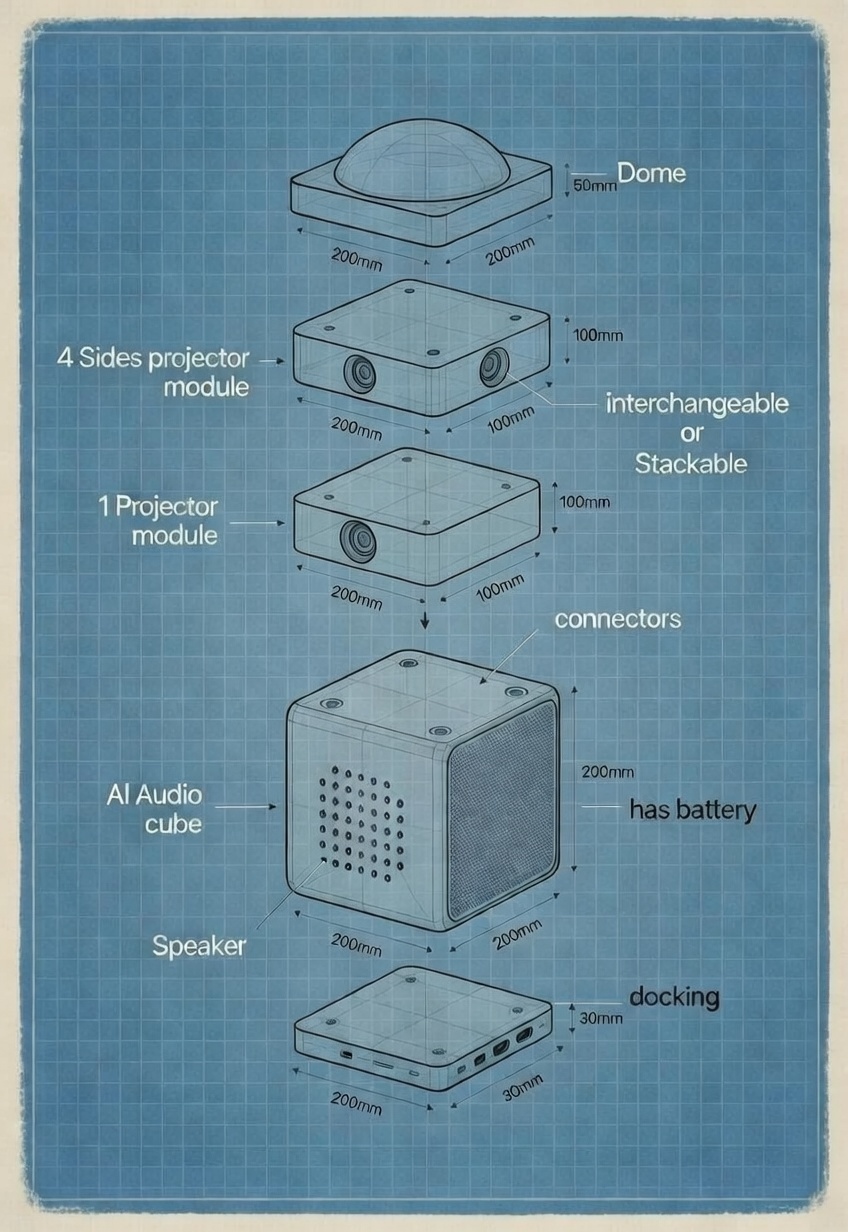
Exploded stack (bottom → top): Docking Station (30mm) · AI Audio Cube (200mm, battery + AI) · 1 Projector Module (100mm) · 4 Sides Module (100mm) · Dome Projector (50mm).
All units share a 200×200mm footprint and the magnetic pogo-pin connector interface.
1. System Overview — Modular Architecture
SKU
Dimensions
Cameras
Controls
Est. BOM
Price
AI Audio Cube
200×200×200mm
1× wide-angle (front)
4 buttons + privacy slide + USB-C — all BACK face
€95–130
€129
Docking Station
200×200×30mm
None
None
€18–28
€39
Dome Projector
200×200×50mm
1× wide-angle (downward)
None
€55–80
€99
1 Projector Module
200×100×100mm
1× wide-angle (forward)
None
€42–68
€79
4 Sides Module
200×200×100mm
4× wide-angle (N/S/E/W)
None
€140–215
€179
Architecture principle: The AI Audio Cube is the only intelligent device. All modules are dumb projection hardware with cameras for self-calibration — compute runs entirely on the Cube. The Cube features 4 child-proof physical buttons, a mechanical privacy slide, and a USB-C 3.1 Gen 1 charging port — all on the BACK face (parent-facing).
The magnetic pogo-pin connector is the most critical hardware design decision in the ecosystem. It must be robust to 1,000+ cycles, child-safe (no exposed pins, magnetic alignment), carry HDMI 2.0 bandwidth, and be manufacturable at low cost. Recommended: magnetic pogo-pin array with a mechanical locking ring.
Signal
Spec
Bandwidth / Rating
Function
Pins
Power
DC 12V / 3A per module
36W max per connector
Powers projection modules via Cube battery when docked
2 + shield
Video
HDMI 2.0 (TMDS)
18 Gbps · 4K@30fps
Sends rendered frames to each projector face
19 (standard)
Control
I2C (400kHz)
Fast mode
Module enumeration, brightness control, on/off
2 (SDA + SCL)
Frame Sync
GPIO pulse (3.3V)
<1ms cross-module
Synchronises frames across all active modules
1
ID / Detection
1-Wire ID ROM
—
Module type identification at hot-plug
1
Ground
Common GND
—
Reference
4 (distributed)
2. AI Audio Cube — Physical Controls Design
The Cube has exactly 4 physical buttons, 1 mechanical privacy slide, and a USB-C 3.1 Gen 1 charging port. All controls are on the BACK face (parent-facing side). All other interactions are voice-controlled. This keeps the device clean and child-appropriate while giving parents easy access to all controls from behind.
Control
Qty
Design Spec
Placement
Function
Power Button
1×
Recessed tactile, child-proof. Recessed 1.5mm to prevent accidental power-off.
ABS sliding tab, detent click in open/closed. 12mm travel. Opaque — blocks ≥99.9% of light to lens.
BACK face
Physically covers camera lens — no software trust required
⚡ USB-C Port
1×
USB-C 3.1 Gen 1 connector, 5V/3A (15W) fast charge. Primary standalone charging input.
BACK face
Standalone charging without Dock — Dock remains optional convenience accessory
Button spec: All controls on BACK face (parent-facing). Tactile switches rated 200,000+ actuations. Power button recessed 1.5mm to prevent accidental activation. Volume buttons raised 2mm with ribbed texture. Camera button has embossed camera symbol. Privacy slide has detent click in open/closed positions, 12mm travel. USB-C 3.1 Gen 1 (5V/3A, 15W) — primary charging path; Dock is optional convenience.
3. Camera System — Full Specification
Total camera count across the full system: 7 cameras. All module cameras serve projection mapping exclusively — no streams stored, no cloud transmission. The Cube camera is activated only by the physical camera button press.
Device
Count
Sensor
Facing
Purpose
Est. Cost
AI Audio Cube
1×
Sony IMX477 (12MP)
Front
Child/toy personalisation, triggered by capture button
Sensor recommendation: OV5647 (5MP, wide-angle, M12 mount, ~€3–5) for all module cameras. Sony IMX477 (12MP) for the Cube camera — higher quality for the personalisation use case.
4. AI Audio Cube — Core Device
The Cube is 200×200×200mm — accommodating a large battery, high-quality speakers, camera, 4 physical buttons, privacy slide mechanism, and a robust connector area for stacking modules. Connector faces: top (module output) and bottom (dock input). All intelligence is here — compute, battery, audio, camera, connectivity.
4.1 Full Bill of Materials
Component
Selection
Spec
Cost (25K+ units)
Notes
Compute SoM
Raspberry Pi CM5 / i.MX 8M Plus
Quad-core A55, 4GB RAM, NPU, GPU
€30–40
NPU for local ML
Microphone Array
4-mic MEMS (custom PCB)
Beamforming, 360°, 44.1kHz
€6–10
Key for child voice capture
Speaker Amplifier
TPA3130 / MAX98357
Class D, stereo 5W+5W
€2–3
—
Camera (Cube)
Sony IMX477
12MP, wide-angle, 1080p30
€6–10
Child/toy personalisation — button-triggered
Privacy Slide
Custom ABS sliding tab
12mm travel, detent click, opaque
€1–2
Mechanically blocks camera lens
Power Button
Recessed tactile switch
200K+ cycles, 1.5mm recess
€0.5–1
—
Volume Up / Down Buttons
Raised tactile switch ×2
200K+ cycles, ribbed texture
€0.5–1 each
—
Camera Capture Button
Tactile switch, camera icon embossed
200K+ cycles, child-proof
€0.5–1
—
Wi-Fi / Bluetooth
Qualcomm QCN9074 / onboard CM5
Wi-Fi 6, BT 5.3
€3–5
Dual-band for stability
Battery
Li-Ion 20Wh (5,400mAh @ 3.7V)
UN38.3 certified, 4hr+ with Dome
€14–18
Must ship as UN38.3
PMIC + Charging IC
Texas Instruments BQ25895
USB-C PD 3.0, 18W charge
€3–5
—
USB-C Connector
USB-C 3.1 Gen 1 receptacle (BACK face)
5V/3A (15W) standalone charging
€0.5–1
Primary charge path; Dock optional
IMU
ICM-42688-P
6-axis, motion + sleep detection
€1.5–2
—
LED Ring
16× WS2812B (diffused)
RGB, story interaction feedback
€2–4
—
Module Connector (top)
Magnetic pogo-pin array (custom)
HDMI + I2C + 12V + GPIO + ID
€4–7
Critical custom part
Dock Connector (bottom)
Magnetic pogo-pin array (custom)
12V power in + data
€3–5
—
Main PCB (6-layer)
Custom, 4oz copper
HDMI routing, power planes
€10–15
At 10K+ volume
Enclosure (ABS)
200mm cube, rounded corners
IP54, child-safe, drop-rated
€16–22
Tooling amortised
Assembly (CM labor)
Contract manufacturer
At 10K+ units
€12–15
—
Packaging
Box + USB-C cable
—
€4–6
—
Total BOM (25K+ units target)
€95–130
4.2 Power States
State
Active Components
Power Draw
Battery Life
Full Active + Dome module
CPU + Audio + Camera + Wi-Fi + Dome
~12W
~4 hours
Story Playback (audio only)
CPU + Audio + Wi-Fi
~4W
~5 hours
Sleep Companion
Audio (low) + IMU
~1.2W
~15 hours
Deep Sleep / Wake-word only
Porcupine wake-word engine
~0.08W
~7 days
5. Docking Station
200×200×30mm flat base. Mains powered (100–240V AC). Provides 12V/3A to the Cube via the bottom connector. Side ports: USB-C (data), HDMI pass-through (for TV/monitor), power LED.
Component
Spec
Cost
AC-DC Power Supply
100–240V in → 12V/3A out, CE certified
€6–10
Top Connector (to Cube)
Magnetic pogo-pin, standard interface
€3–5
USB-C Port + Controller
USB 3.0, data only
€2–4
HDMI Pass-Through
HDMI 2.0, from Cube output
€1–2
PCB (2-layer)
Simple, low-cost
€3–5
Enclosure (ABS)
200×200×30mm, non-slip base
€5–8
Assembly
Simple BOM
€4–6
Total BOM
€24–40
6. Dome Projector
200×200×50mm. Houses a single pico projector pointing upward through a fisheye lens (≥160° FOV) that covers the full ceiling at 2.5m height. Includes a downward-facing camera for autonomous ceiling projection mapping and obstacle detection. Passively cooled — silent at bedtime.
Component
Spec
Cost
Pico projector (DLP)
720p, 200 lumens, compact module
€25–38
Fisheye lens (M12, upward)
≥160° FOV, equidistant, factory-aligned
€10–18
Camera (OV5647, downward)
5MP, wide-angle — ceiling mapping
€3–5
Camera mount bracket
Precision-moulded ABS, fixed downward angle
€1–2
Passive heatsink
Aluminium, for 200-lumen DLP
€2–4
Connector (bottom, magnetic pogo)
Standard interface — power + HDMI + I2C
€3–5
PCB (driver + camera interface)
HDMI in → projector, camera CSI out
€4–6
Enclosure (200×200×50mm)
Upward aperture + camera port (down)
€6–10
Assembly
—
€5–8
Total BOM
€59–96
7. 1 Projector Module
200×100×100mm. Single forward-facing pico projector for one-wall projection. Includes a forward-facing camera with a dual role: wall geometry mapping + real-time person/eye safety detection (auto-dims projector within 200ms if a child walks in front).
Component
Spec
Cost
Pico projector (DLP)
720p, 150 lumens
€22–32
Projection lens
~80° FOV, forward-facing
€5–8
Camera (OV5647, forward)
5MP, wide-angle — wall mapping + person detection
€3–5
Camera mount bracket
Fixed forward angle, aligned with projector axis
€1–2
Connector (bottom, magnetic pogo)
Standard interface
€3–5
Passive heatsink
—
€1–3
PCB (driver + camera + I2C dim ctrl)
Camera → Cube; I2C dim command input
€6–10
Enclosure (200×100×100mm)
Front aperture + camera port (forward)
€5–8
Assembly
—
€5–8
Total BOM
€51–81
Safety feature: The 1-Proj camera runs real-time TFLite MobileNet person detection continuously during projection. If a child steps in front of the beam, the projector dims automatically within 200ms via I2C dim command. EN 62471 photobiological safety certification required.
8. 4 Sides Module
200×200×100mm. Four pico projectors facing N/S/E/W with 4 cameras (one per face) for per-face projection mapping and edge blending. Active cooling required for four simultaneous projectors.
Component
Spec
Cost
4× Pico projectors (DLP)
720p, 150 lumens each
€80–120
4× Projection lenses
~80° FOV each
€16–24
4× Cameras (OV5647)
One per face (N/S/E/W) — wall mapping
€12–20
4× Camera mount brackets
Per-face fixed alignment
€4–6
HDMI distribution IC
4-channel HDMI router
€6–10
Connector (bottom, magnetic pogo)
Standard interface
€3–5
Active cooling (40mm fan)
Required for 4× projectors simultaneously
€4–7
PCB (complex 6-layer)
4× projector + 4× camera routing
€14–20
Enclosure (200×200×100mm)
4 side apertures + 4 camera ports + ventilation
€12–18
Assembly
—
€8–12
Total BOM
€159–242
9. Thermal Analysis
Total power draw at full stack (Cube + Dome + 4 Sides): ~36W system load. Each module has its own thermal path to ambient — the stack connector does not transfer heat between modules.
Configuration
Total Power
Thermal Risk
Cooling Strategy
Cube only
~4W
None
Passive (Cube)
Cube + Dock
~4W
None
Passive
Cube + Dome
~12W
Low
Passive (both)
Cube + 1-Proj
~10W
Low
Passive (both)
Cube + 4-Sides
~28W
Medium
Active fan (4-Sides)
Cube + Dome + 4-Sides (Full Universe)
~36W
Medium
Active fan (4-Sides) + passive (Dome)
10. Certifications & Compliance
All five SKUs require CE marking for EU market sale. EN 62471 photobiological safety is mandatory for all projection modules. Engage test labs early in Phase 3 to avoid Phase 4 schedule risk.
Certification
Applies To
Reason
Est. Cost
Timeline
CE Mark (EMC + Safety)
All 5 SKUs
EU market entry
€5–15K/SKU
3–6 months
EN 71 Toy Safety
Cube + Dock
Children's toy directive
€3–8K
2–3 months
EN 62471 Photobiological Safety
1-Proj, 4-Sides, Dome
Projector beam eye safety
€4–8K/SKU
2–3 months
RoHS / REACH
All 5 SKUs
Hazardous materials
€1–3K total
2 months
UN 38.3 (Battery)
AI Audio Cube (Li-Ion)
Transport safety
€2–4K
6 weeks
FCC Part 15 (USA)
All 5 SKUs
US market entry
€5–10K/SKU
3–4 months
COPPA / GDPR (Software)
Software + Data
Child data protection
€8–20K (legal)
2–3 months
Total Budget Estimate: €60–110K. EN 62471 photobiological safety is mandatory for all 3 projection modules — the 1-Proj auto-dim safety feature should be documented as a risk-reduction measure in the technical file. Pre-compliance testing should begin in Phase 3 (Month 12). Prioritise Cube + Dome first for EU launch.
11. Education System — Hardware Implications
The v4 education system introduces three age-differentiated experience tiers, each placing distinct hardware demands on the Cube. All educational content is processed on-device — the NPU on the Compute SoM handles age-adaptive inference, while Adventure Course packs are stored in onboard flash. No additional hardware is required beyond the base Cube specification.
Age Tier
Age Range
Key Hardware Demands
Audio Profile
Projection Use
🌱 Seedlings
3–5 years
Simple voice prompts only; low CPU load; large LED feedback cues for milestones
Slow TTS, high clarity, soft volume ceiling (60 dB max)
Simple shapes + colour; no complex geometry
🧭 Explorers
5–7 years
Moderate NLP complexity; IMU used for gesture-based interaction; richer LED animations
Standard TTS rate; mild sound effects via amplifier
Scene illustrations projected; auto-keystone active
🏔️ Adventurers
7–10 years
Full AI pipeline at max token load; multi-turn reasoning; Adventure Course pack streaming from flash
Full audio quality; dynamic music via MusicGen; multi-voice TTS
Full immersive projection with all active modules
Adventure Course Storage: Each downloadable Adventure Course pack is estimated at 50–150 MB (compressed audio + vector assets). The Compute SoM (CM5) includes 32 GB eMMC flash — sufficient for 100+ course packs without SD card expansion. Packs sync via Wi-Fi 6 during idle/charging states.
11.1 Education Hardware Requirements Summary
Requirement
Hardware Component
Spec / Detail
Status
Age-adaptive inference (NPU)
Compute SoM (CM5 / i.MX 8M+)
NPU handles on-device TFLite models for age-tier detection and content adaptation
Covered by base BOM
Adventure Course local storage
eMMC Flash (32 GB)
100+ course packs at 50–150 MB each; no SD expansion needed
Covered by base BOM
Milestone LED feedback
16× WS2812B LED Ring
Custom animation sequences per tier (slow pulse for Seedlings → rapid burst for Adventurers)
Covered by base BOM
Curriculum mapping TTS (EYFS/KS1/KS2, Common Core)
Speaker Amplifier (TPA3130)
Stereo 5W+5W; age-appropriate volume ceiling enforced in firmware
Covered by base BOM
Parental tier control
4 physical buttons — BACK face
Age tier selection via button combination on BACK face; no app required
Covered by base BOM
Projection curriculum content
Modules (Dome / 1-Proj / 4-Sides)
Educational scene images projected during Adventure Courses; modules are optional add-ons
Module hardware
Curriculum coverage: EYFS (Early Years Foundation Stage), Key Stage 1 and Key Stage 2 (UK); Common Core State Standards (US); subject areas include language & literacy, numeracy, science, geography, and history. All content adapts dynamically — no separate hardware SKUs required for education vs. entertainment modes.